
How to Display Zazzle Products on Shopify
Z-Feed Integration for Shopify

Integrating Z-Feed into your Shopify website takes just minutes. Add your Z-Feed script to a page, blog post, or theme section, then configure it using your store name, collection Id, or search term.
Once added, Z-Feed will automatically display live Zazzle products in a responsive grid or horizontal slider. The feed updates dynamically, so your content stays current without manual product updates.
Choose how you want to add Z-Feed to Shopify:
-
1A - Theme Editor (no code)
-
1B - Page Content / Blog HTML
-
1C - Theme Code (advanced)
Shopify - Integration Steps
With Shopify, there are multiple ways to add HTML to your website. See options 1A, 1B, and 1C below.
Step 1-A: Online Store -> Theme Editor -> Add Custom Liquid element and paste the Z-Feed script tag with your Store Id and other optional settings.
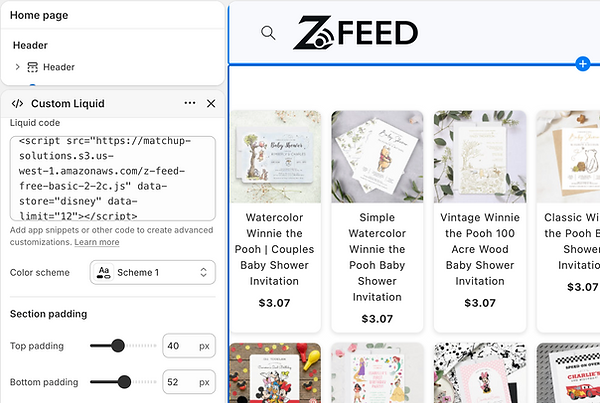
Step 1-B: Online Store -> Pages -> HTML Edit: Under Content click "</> (Show HTML)" and paste the Z-Feed script tag with your Store Id and other optional settings.

Step 1-C: Online Store -> Edit Code: In the location you want to display Zazzle products, paste the Z-Feed script tag with your Store Id and other optional settings.

Step 2: Save / Publish and View your products.

Z-Feed Examples With Code Snippets
<script src="https://matchup-solutions.s3.us-west-1.amazonaws.com/z-feed-free-basic-2-2c.js" defer
data-store="chrisdavenportdok"
data-collection="119027605726002098"
data-limit="20"
data-affiliate="238121889428385595"
data-heading="Holiday Best Sellers"
data-mode="strip"
data-strip-cards="5">
</script>
<script src="https://matchup-solutions.s3.us-west-1.amazonaws.com/z-feed-free-basic-2-2c.js"
data-store="disney"
data-limit="8"
data-affiliate="238121889428385595"
data-heading="Disney - Top Products"
data-subheading="Grid Mode: Max = 8, Cards/Columns = 4"
data-mode="grid"
data-cards="4">
</script>
<script src="https://matchup-solutions.s3.us-west-1.amazonaws.com/z-feed-free-basic-2-2c.js"
data-store=""
data-collection=""
data-limit="7"
data-affiliate=""
data-container=""
data-search="beach wedding invitations"
data-heading="Search Results - Beach Wedding Invitations"
data-subheading="Grid Mode: Max = 7, Cards/Columns = 3"
data-mode="grid"
data-cards="3">
</script>
<script src="https://matchup-solutions.s3.us-west-1.amazonaws.com/z-feed-free-basic-2-2c.js"
data-store="sandraboynton"
data-collection=""
data-limit="20"
data-affiliate=""
data-heading="Sandra Boynton - Best Sellers"
data-subheading="Defaults example with only Store Id specified">
</script>
Start Adding Zazzle Products Today
Get started with Z-Feed and add your Zazzle products to any website in seconds.