
How to Display Zazzle Products on Wix
The Zazzle Product Feed for Wix

Integrating Z-Feed into your Wix website takes just minutes. Simply copy and paste your Z-Feed script into your Wix page Embed HTML element, and customize it with your store ID, collection, or search term.
Once published, Z-Feed automatically pulls live products from Zazzle and displays them in a clean, responsive grid or horizontal slider that matches your site’s design. No complex setup, no manual product updates, no more cut & pasting products 1 by 1 - just dynamic, always current content that keeps your Wix site fresh and professional.
Wix Editor - Integration Steps
Step 1: Add Element: Embed Code -> Embed HTML element

Step 2: HTML Settings: Click "Code" and paste the Z-Feed script tag with your Store and other settings and click "Apply".
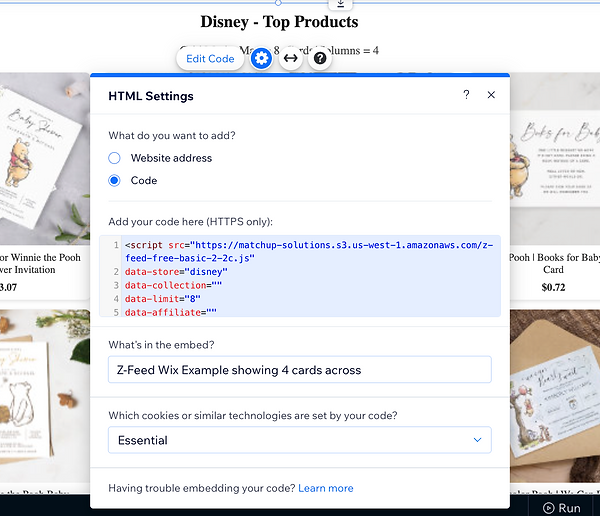
Step 3: Save & Preview or Publish to see your Z-Feed.

Z-Feed Examples With Code Snippets
<script src="https://matchup-solutions.s3.us-west-1.amazonaws.com/z-feed-free-basic-2-2c.js"
data-store="chrisdavenportdok"
data-collection="119027605726002098"
data-limit="20"
data-affiliate="238121889428385595"
data-heading="Holiday Collection"
data-subheading="Mode: Horizontal Strip/Slider, Collection example"
data-mode="strip"
data-strip-cards="5">
</script>
<script src="https://matchup-solutions.s3.us-west-1.amazonaws.com/z-feed-free-basic-2-2c.js"
data-store="disney"
data-limit="8"
data-affiliate="238121889428385595"
data-heading="Disney - Top Products"
data-subheading="Grid Mode: Max = 8, Cards/Columns = 4"
data-mode="grid"
data-cards="4">
</script>
<script src="https://matchup-solutions.s3.us-west-1.amazonaws.com/z-feed-free-basic-2-2c.js"
data-store=""
data-collection=""
data-limit="7"
data-affiliate=""
data-container=""
data-search="beach wedding invitations"
data-heading="Search Results - Beach Wedding Invitations"
data-subheading="Grid Mode: Max = 7, Cards/Columns = 3"
data-mode="grid"
data-cards="3">
</script>
<script src="https://matchup-solutions.s3.us-west-1.amazonaws.com/z-feed-free-basic-2-2c.js"
data-store="sandraboynton"
data-collection=""
data-limit="20"
data-affiliate=""
data-heading="Sandra Boynton - Best Sellers"
data-subheading="Defaults example with only Store Id specified">
</script>